 UnityAds
This extension provides integration with the Unity Ads SDK for iOS and Android.
Features:
- ✔ Video ads
- ✔ Rewarded video ads
- ✔ Banner ads
GDPR Compliance
UnityAds will automatically present users with an opportunity to opt-out of targeted advertising. See https://unityads.unity3d.com/help/legal/gdpr
It is also possible to set the consent programmatically, using the set consent to YES/NO block (see documentation and block section).
Documentation and Block Examples
Step 1: If you don’t have an account, create one at https://operate.dashboard.unity3d.com
Step 2: Create a project and add your platfom (iOS/Andoid)
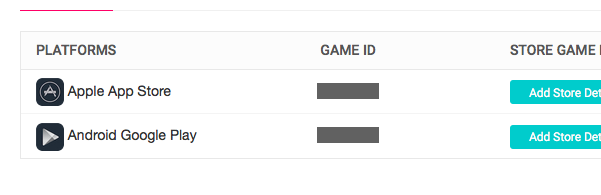
Step 3: Open Project and get your Game id of the Platform you work with.
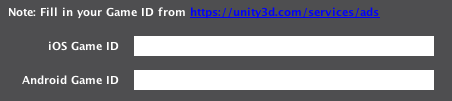
Fill your Game id in the Toolset Manager
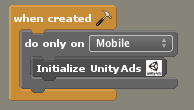
Step 4: Use the initialize UniAds block in when created event of your first (loading)scene.
If your game is not live yet, enable Testads in the Toolset Manager, don’t forget to disable Testads when your uploading your game to the store.

Step 5: Open the Platform you work with (iOS or Android) and get your Integration Id of the placements your added.
In this example i use iOS platform:
The Integration Id of Ad Placement Video is video
The Integration Id of Ad Placement Rewarded Video is rewardedVideo,
make sure you have enabled the Rewarded Video.
Step 6: Show Video with placement id.
Show Unityads Video with placement id block,

Step 7: Show Rewarded Video.
Show Unityads Rewarded Video with placement id block,
Create and Alert title and Message that ask the player if he wants to watch the Rewarded Video or not. If Alert title is empty no Alert box will show.

Step 8: Can Show Ads
Check if ads with placement id can be show , it return true when it can show and false if ads cannot be show.

Step 9: Callbacks
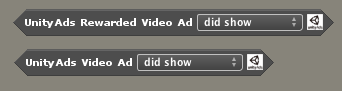
Use the callback blocks in an Updated event in an if statement.
– did show
– is completed
– is skipped (Video only, Rewarded cannot be skipped)
Banner Support
Show Banner with PlacementId

Show the banner, by defeault at the bottom.
Hide Banner

Hide the banner.
Move Banner

Move the banner to top or back to bottom.
Banner Callbacks

Button Example:
Video ad:
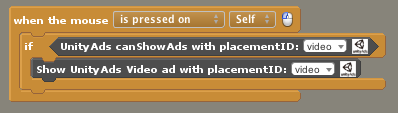
Rewarded ad:

Set/Get Consent value (for Europe users only)
Set Consent

This block is optional for UnityAds.
But if you want to set the consent programmatically you can use this block.
YES: Yes, i agree to personalized experience.
NO: No, I do not want personalized experience.
Go to https://unityads.unity3d.com/help/legal/gdpr for more information.
Get Consent

Return true(YES) if consent is set to YES and return false(NO) when consent is set to NO.
If you want to check if a user is in Europe, you can use the "User is in Continetn: Europe" boolean block from https://byrobingames.github.io